

MarbleOS
ProductivityA workspace with visible files, tools, tasks, and outputs
Unclaimed listing
Found via hacker-news ↗
Unclaimed listing
Sign in to claimClaim MarbleOS
Verify ownership to edit this listing, publish updates, access analytics, and use launch tools.
What it does
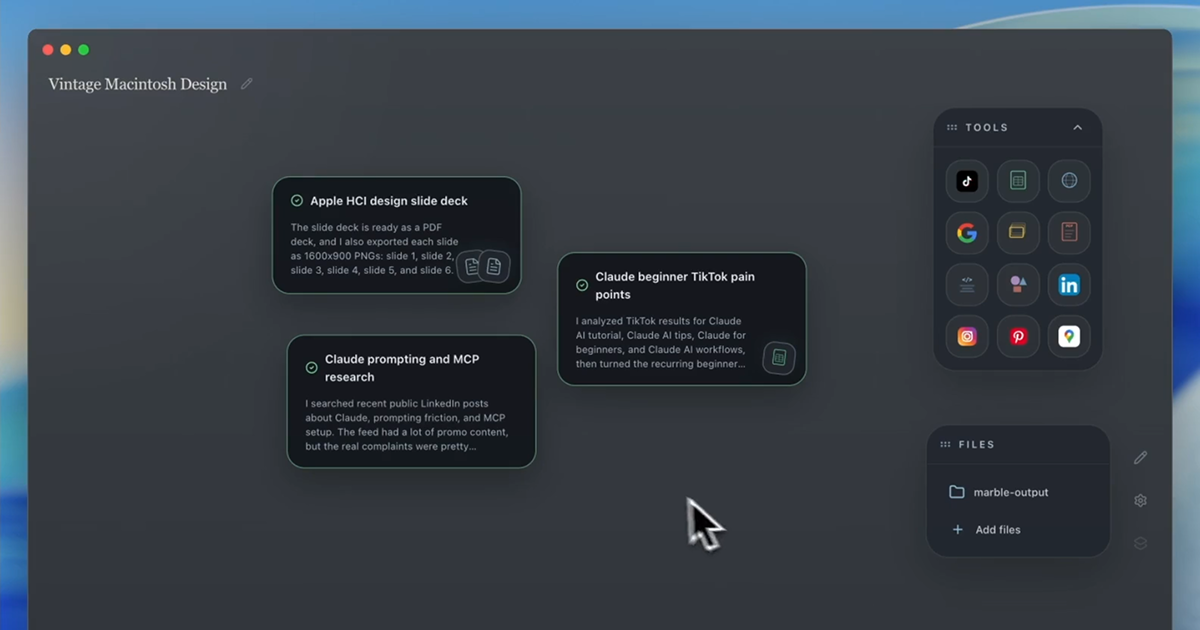
MarbleOS is a GUI workspace for running and managing AI agents with a focus on keeping work artifacts visible. Instead of burying context in chat threads, it presents files, tools, tasks, and outputs together so you can follow what an agent is doing and review what it produced.
MarbleOS is built for people who want a more structured way to work with AI agents than a chat-only interface—where the important parts of the workflow (inputs, intermediate steps, and results) remain easy to find and inspect.
Use MarbleOS to organize agent work around clearly surfaced components:
• Files: keep the agent’s relevant files visible in the workspace. • Tools: access the tools the agent uses as part of its workflow. • Tasks: track the work the agent is performing. • Outputs: review what the agent produces without digging through long conversation logs.
MarbleOS is available as a beta download, and additional demos are provided alongside onboarding materials for getting started. A waitlist is also available for access and updates as the product evolves.
If you’re evaluating AI agents for real work, MarbleOS aims to make agent activity and results easier to navigate by putting the key artifacts front and center in a dedicated workspace interface—so you can stay oriented, find outputs faster, and keep agent work organized beyond a single chat thread view.
Download the beta to try it, follow the onboarding flow, and explore the demos to see how the workspace surfaces tasks, tools, files, and outputs in one place for agent-driven workflows.
Join the waitlist if you want updates on availability and future access as MarbleOS expands beyond the current beta experience shown in the demos section and onboarding flow.
MarbleOS is positioned as a workspace UI layer for AI agents, with an emphasis on visibility and organization of the full workflow artifacts (not just messages). This structure is intended to support clearer review and easier handoff of agent work by keeping outputs and the supporting context easy to locate within a single GUI.
Launch details
Built for the work
Categories
Productivityproductivityai-agents


Community
Discussion
No comments yet. Start the conversation.